GardenHub · Alpha

Features.

Practical tools. A shared garden. Start with what you need today. Add more detail as your garden grows.

Plan

Garden Planner

Plan your real garden.

Build a measured top-down layout with beds, plants, paths, structures and garden objects.

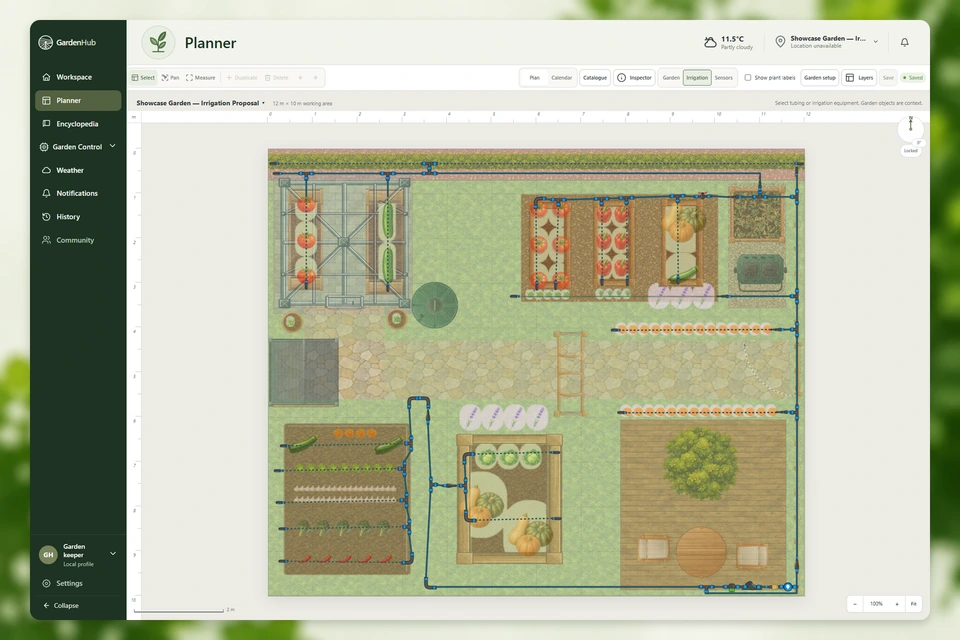
Current GardenHub Planner with the entire showcase garden, application sidebar and header.
Garden Planner

Start with the space you have

GardenHub Planner lets you build a top-down plan of your garden based on the real space you have. Set the size and orientation, then build the layout around it.

Add beds, containers, plants, paths, structures, boundaries and garden objects. Move, resize, rotate and group objects as the garden takes shape. The plan can change with your garden; it does not need to be finished all at once.

Build the whole space

The Planner is not only for placing plants. Objects can be positioned and organised to create a practical representation of the real garden.

  • Plants, beds and containers
  • Paths and surfaces
  • Fences, walls, boundaries, doors and entrances
  • Garden structures, furniture and objects
  • Available irrigation components

Keep things organised

Select individual objects or work with several together. Grouping makes it easier to build larger parts of the garden and move or organise them without rebuilding everything individually.

The Planner is designed to make detailed gardens possible without requiring every garden to be complicated.

Plan irrigation in the same space

The dedicated irrigation view is being developed so your garden can remain visible while you work on the watering network. Water sources, tubing, fittings, valves, manifolds and drip-line connections can be planned around the beds and paths already in your layout.

Connection points, fitting types, tubing diameters and snapping are part of this planning direction. Irrigation planning remains in development; it is not a promise of connected control or automatic watering.

More than a drawing

The Planner is the foundation of GardenHub. A plant placed in a bed is not intended to remain just an icon on a map. Over time, its location can connect with growing information, weather, watering and garden history.

The goal is to build the garden once and let the rest of GardenHub grow around it.

Planned

A more connected garden

Future work includes deeper irrigation tools, garden sensors and other features that use the layout to understand where something is happening, not only that it happened. These deeper connections are not all available in the current Alpha.

WaterIn development

Irrigation Planning

Design irrigation around your garden.

Edit the irrigation network in your garden plan with components and connections. Hydraulic capacity and physical installation validation are not yet complete.

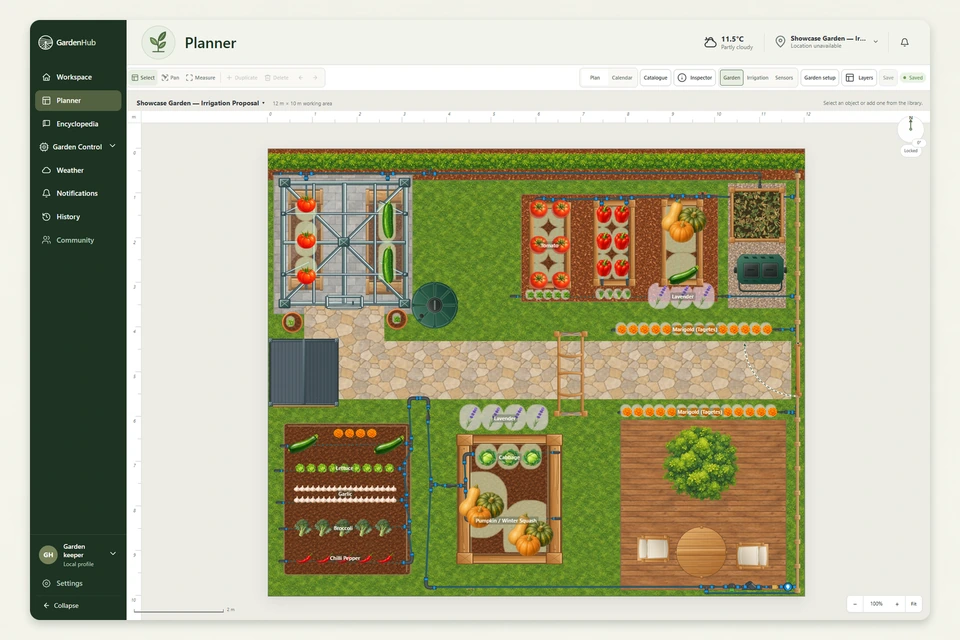
Current irrigation view with the saved showcase network, dimmed garden context and hidden plant labels.
Irrigation Planning

Design around the real layout

GardenHub brings irrigation planning into the Garden Planner. The direction is to work with the same beds, plants, paths and structures instead of designing a separate watering sketch.

In the irrigation view, the garden provides the background while the watering network is built on top. This capability is still being developed.

Build the irrigation network

Start from the water source and plan with irrigation components from the catalogue. Available components and their behaviour will develop with the Planner.

  • Tap and irrigation adapters; tubing and irrigation lines
  • Straight connectors, elbows, T-junctions and four-way junctions
  • End caps and shut-off valves
  • Pressure regulators and filters
  • Timer and controller representations
  • Manifolds, distributors, drip-line connections and micro-sprayers

Connections that make sense

The planning direction treats irrigation components as more than symbols on a map. Connection points, fitting types and tubing diameters can help compatible components connect correctly.

Snapping supports connecting compatible tubing and fittings. Hydraulic capacity and physical installation validation are not yet complete.

See irrigation in context

Beds, containers, plants, paths and structures stay part of the picture. That context helps you think about where water needs to travel and what it needs to reach before installing or changing a real system.

Built for more than planning

The layout provides physical context: where water starts, where it travels and which parts of the garden it serves. Later, this can connect with weather, plant needs, watering history, sensors and garden conditions.

Planned

Connected control comes later

Future work can build on the same network with irrigation zones, connected sensors, watering history and more informed watering decisions.

Hydraulic calculations, connected control, smart watering and automatic irrigation are not presented as available Alpha functionality. Physical automation will require working integrations, safeguards and testing.

Learn

Plant Encyclopedia

Find the important information first.

Check spacing, sunlight, watering and growing periods, then explore deeper guidance when you need it.

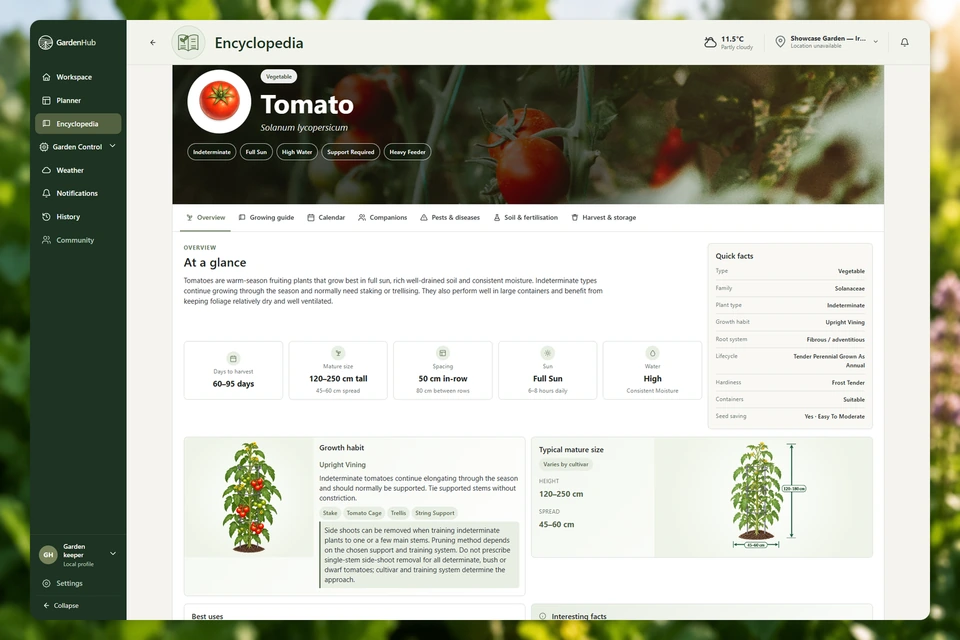
Current Tomato Encyclopedia with its banner, plant information, facts and plant illustrations.
Plant Encyclopedia

Quick answers for real gardening

GardenHub Encyclopedia is designed to answer common plant questions quickly. See when to sow and transplant, how much space a plant needs, its preferred sunlight and watering, expected size, growing period and harvest information without searching through a long article.

The most useful information stays easy to find, while more detailed guidance is available when you need it.

From quick reference to growing guide

Every gardener needs a different amount of information. The overview gives you the essentials at a glance. The Growing Guide goes deeper into growing and caring for the plant throughout the season. Depth varies by plant.

  • Sowing, transplanting, spacing and mature size
  • Sunlight, water needs, growing and harvest periods
  • Containers, growing conditions, feeding and care
  • Support, pruning and training
  • Pests, common problems, wet-weather and watering guidance where available
  • Seed saving and lifecycle information

Built for the garden

The Encyclopedia is not intended to remain separate from GardenHub. Plants used in the Planner can connect back to their growing information.

As GardenHub develops, that connection can become more specific to the plant, its position and the conditions in your own garden.

Growing information that stays practical

The aim is not the longest possible article about every plant. It is useful information that is easy to find, with deeper details organised for when you need them.

Planned

From a species to your plant

Future features such as Plant Inspector are intended to bring together a particular plant, its position, local conditions, garden history and other available information. Plant Inspector and these deeper garden-specific connections are not available in the current Alpha.

Observe

Weather & Historical Insights

Weather with your garden in mind.

Keep current conditions, the hourly outlook and available historical weather alongside your garden.

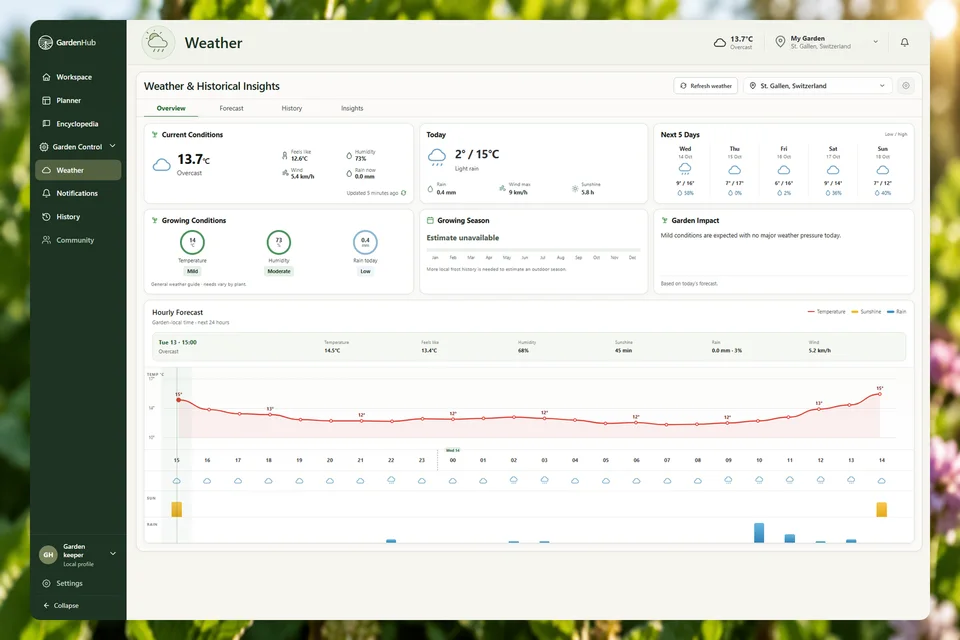
Current GardenHub weather dashboard with real weather data, five-day forecast and hourly chart.
Weather & Historical Insights

Weather in the same workspace

See current conditions, today’s outlook and hourly weather without leaving GardenHub. The aim is to make weather part of the information used to understand what is happening in the garden.

See what is happening now

The weather overview gives you a quick picture of current conditions. Depending on the available weather data, this can include:

  • Temperature and feels-like temperature
  • Daily high and low
  • Humidity, wind and rainfall
  • Current conditions and hourly forecast

Look back, not only forward

Current weather only tells part of the story. GardenHub can also keep historical weather information so you can look back at conditions your garden has experienced.

Recent rain, temperature changes and previous conditions provide useful context for understanding the garden today.

From weather to garden context

As GardenHub develops, weather can work together with plants, irrigation and garden history. Expected rain can gradually become context for watering and other decisions, rather than remaining an isolated forecast.

Keep the history

Weather events can become part of the garden’s history. This record can later help explain changes and provide context for previous watering, conditions and decisions. Available history depends on the information actually recorded.

Planned

Deeper connections

Future features will make greater use of weather alongside plants, irrigation and connected data. The goal is to help explain what conditions mean for your garden. These deeper connections will be introduced progressively as the relevant features become available.